Synchronize Streaming
Unified chat, activity feed, alerts, commands and much more.
Nothing to install, easy to use.
Integrations









Multi-chat
Widgets: Chat

Features
Chat & activity
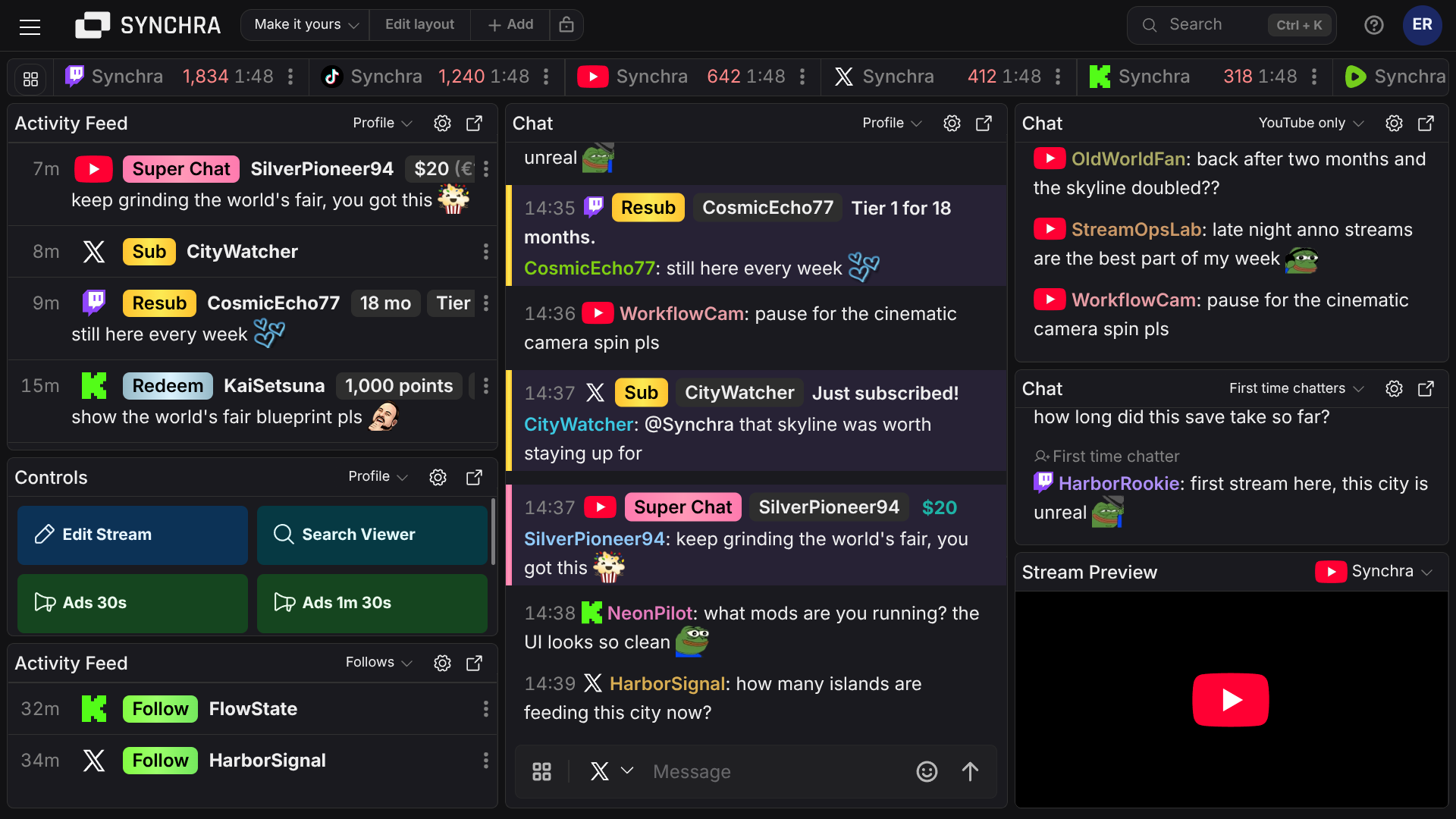
Multi-chat
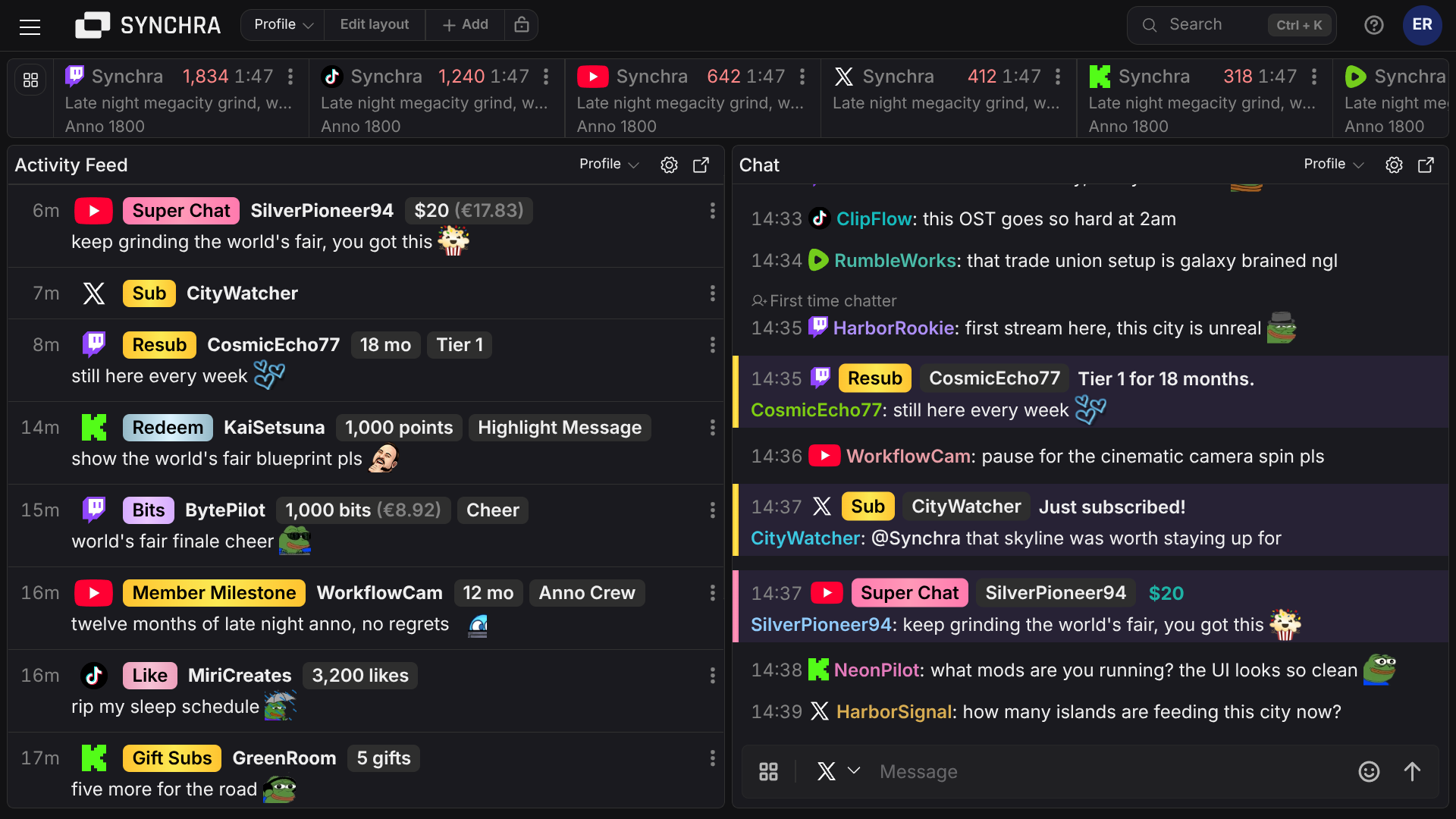
Unified chat. Reply, moderate and keep up with your chatters without switching tabs.
Activity Feed
Subs, gifts, bits, memberships, donations and other activity from your platforms in one unified activity feed.
Saved Filters
Save chat and activity feed filters and switch between them per panel - focus on exactly what matters right now.
Sound Notifications
Hear when chat messages or activity need your attention.
Stats
See a channel stats summary and recent streams without opening separate analytics pages.
On-stream widgets
Activity Alerts
Trigger OBS stream alerts when follows, subs, gifts, donations and raids come in. Style them with themes, images, videos, sounds and text-to-speech.
Multi-chat Widget
Show chat from all your connected platforms on stream with a customizable OBS browser source.
Goal Widget
Show a live OBS progress bar for donation goals, sub goals, follower goals, bit goals or mixed stream goals.
Streamathon Widget
Run a subathon-style OBS countdown timer where subs, gifts, memberships, bits, donations and tips can add time.
Giveaway Widget
Show live entries, an optional countdown and an animated winner reveal in your OBS overlay.
And more widgets
Leaderboards, tug of war and viewer counts, with built-in styling and custom CSS for your OBS overlays.
Controls & automation
Controls
Build dashboard buttons for stream edits, chat messages, ads, viewer search and slash commands. Chain controls together for repeated stream tasks.
Multi Title Change
Update stream titles from one place with categories and tags.
Commands, Timers & Filters
Set up commands, timers and filters for writable chat platforms with variables, custom scripts, titles, Spotify, queues, quotes and more.
Custom Bot Name
Connect a dedicated Twitch, YouTube, or Kick account as your own named bot - no third-party branding.
Spotify Integration
Use Spotify playback data in commands, current song, artists, progress, duration, previous song and playlist details.
Live Notifications
Send a custom message to Discord or any webhook when your channel goes live.
Community
Giveaways
Run one giveaway across all your platforms. Bring your audiences together with a customizable OBS giveaway widget.
Viewer Queue
Let viewers join a queue to play with you. Manage entries and pick participants right from the dashboard.
Quotes
Let viewers save memorable moments with !quote.
Make it yours
Shape the dashboard around the way you actually stream. Custom filter profiles, your own control buttons and automations that match each platform's supported actions.
Custom Filters
Multiple filter profiles for chat and the activity feed. Filter by mentions, first time viewer, keywords, mods/subs and many more.
Customizable Controls
Build your own buttons to run ads, change title, category, send messages and more
Automation
Use custom command scripts or chain controls together - for example, switch game and update the title with one click on all your platforms.
Ready to synchronize your streams?
Connect your platforms in minutes and manage everything from one place.
Get Started