Synchra Multi Streaming Dashboard
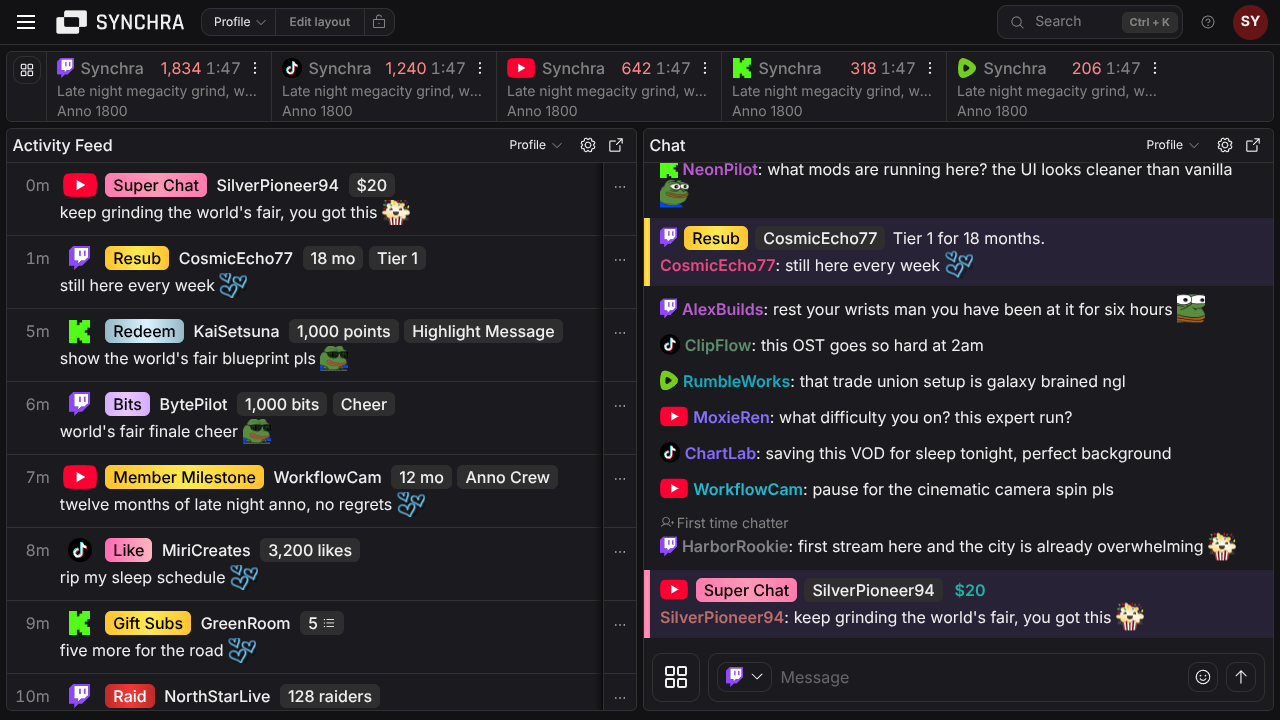
Manage your streams from one customizable dashboard. Bring chat and activity from your connected platforms into one view, preview your streams, and arrange the panels and controls however you want.
Set up the dashboard your stream actually needs
Synchra's dashboard is made from panels you can move and resize. Keep the default chat-and-activity layout, or save a layout around the parts of the stream you handle most.
Multi-chat
Read chat from your connected stream platforms in one view and reply from the same dashboard where the platform allows it.
Activity Feed
Watch follows, subs, gifts, tips, donations and other supported activity without opening each platform dashboard.
Connected Platforms
See connected platforms, live status and stream details in one panel, with controls for supported stream actions.
Stream Controls
Build clickable controls for stream edits, chat messages, ads, viewer search and slash commands, then chain repeat tasks together.
Stream Preview
Keep a live video preview for a selected stream platform next to chat, activity and controls.
Save layouts for different ways of working
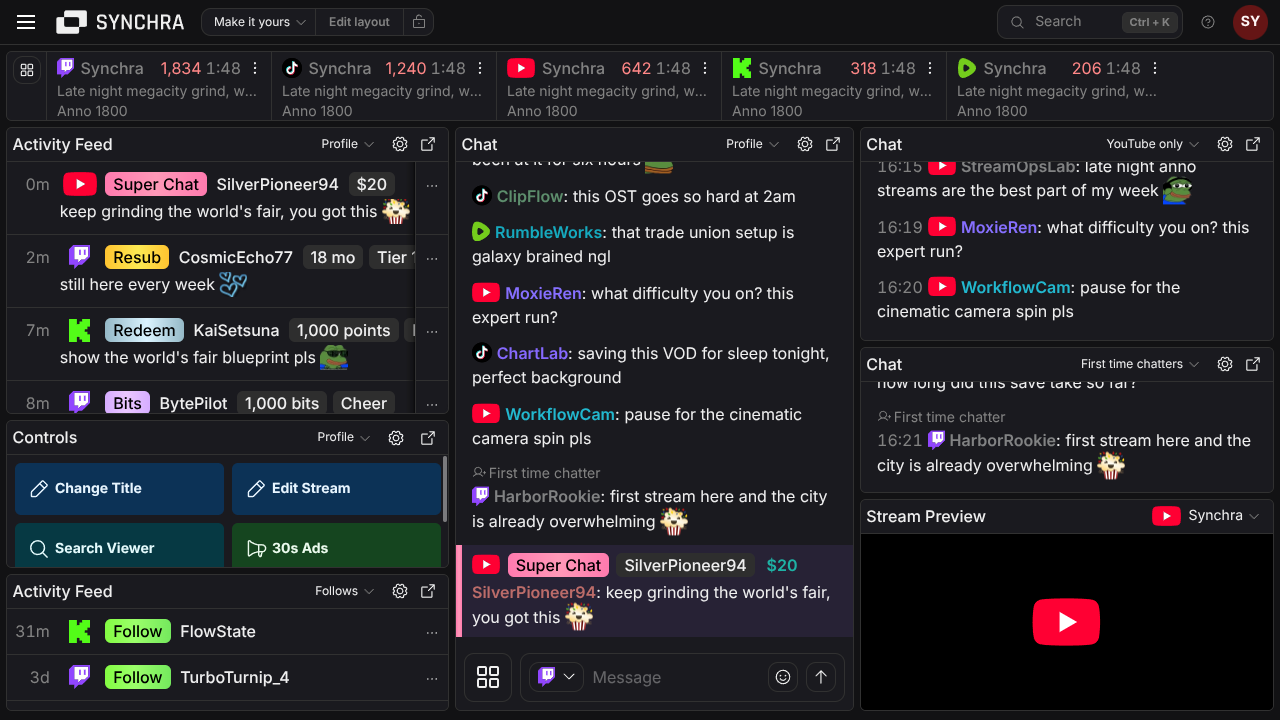
One stream might need chat and moderation front and center. Another might need controls, activity and preview. Saved layouts let you switch between those setups.
Saved dashboard layouts
Create different dashboard layouts for daily streams, moderation, stream checks or special events, then switch when the job changes.
Move and resize panels
Add, remove and resize dashboard panels on desktop. Lock the layout when it is ready so accidental clicks do not move anything.
Separate settings per panel
Keep separate settings for chat, activity feed and controls, so each dashboard panel can have the filters and options it needs.
Popout windows
Open chat, activity feed or controls in a separate window when you want them on another monitor.
Back up and reuse layouts
Export dashboard layouts as JSON for backup, then import them when you need the same setup again.
Mobile stream checks
Use the mobile dashboard tabs for chat, controls, preview and OBS remote when you need to check or adjust the stream away from the main desk.
FAQ
What is the Synchra dashboard?
The Synchra dashboard is a browser-based streaming dashboard for multi-chat, activity, connected platforms, stream previews, stream controls, moderation tools and OBS widgets.
Which stream platforms can I manage from the dashboard?
Synchra supports Twitch, YouTube, Kick, TikTok, Rumble, X, and Owncast in the dashboard. What you can do depends on the platform; for example, some chats are writable and some are read-only.
What dashboard panels are available?
The dashboard currently includes Multi-chat, Activity Feed, Stream Controls, Stream Preview and Connected Platforms panels.
Can I customize the dashboard layout?
Yes. You can add, remove and resize panels, lock the layout, save dashboard layouts, duplicate them, rename them, and import or export them as JSON.
Can each panel use its own settings?
Yes. Dashboard panels can keep their own settings, such as chat filters, activity feed filters or stream control layouts.
Can I pop dashboard panels out?
Yes. Synchra supports popout windows for focused panels such as chat, activity feed and controls.
Do I need to install the dashboard?
No. Synchra runs in the browser, so you can open the dashboard without installing local software.
Does the dashboard replace OBS?
No. Synchra works alongside OBS. Use Synchra for chat, activity, controls, stream alerts and stream management, then add Synchra widgets to OBS as browser sources when needed.
Open one dashboard for your next multistream
Connect your stream platforms, open the dashboard and keep chat, activity, previews and repeat controls where you can see them.
Open Synchra dashboard