Unified Stream Alerts
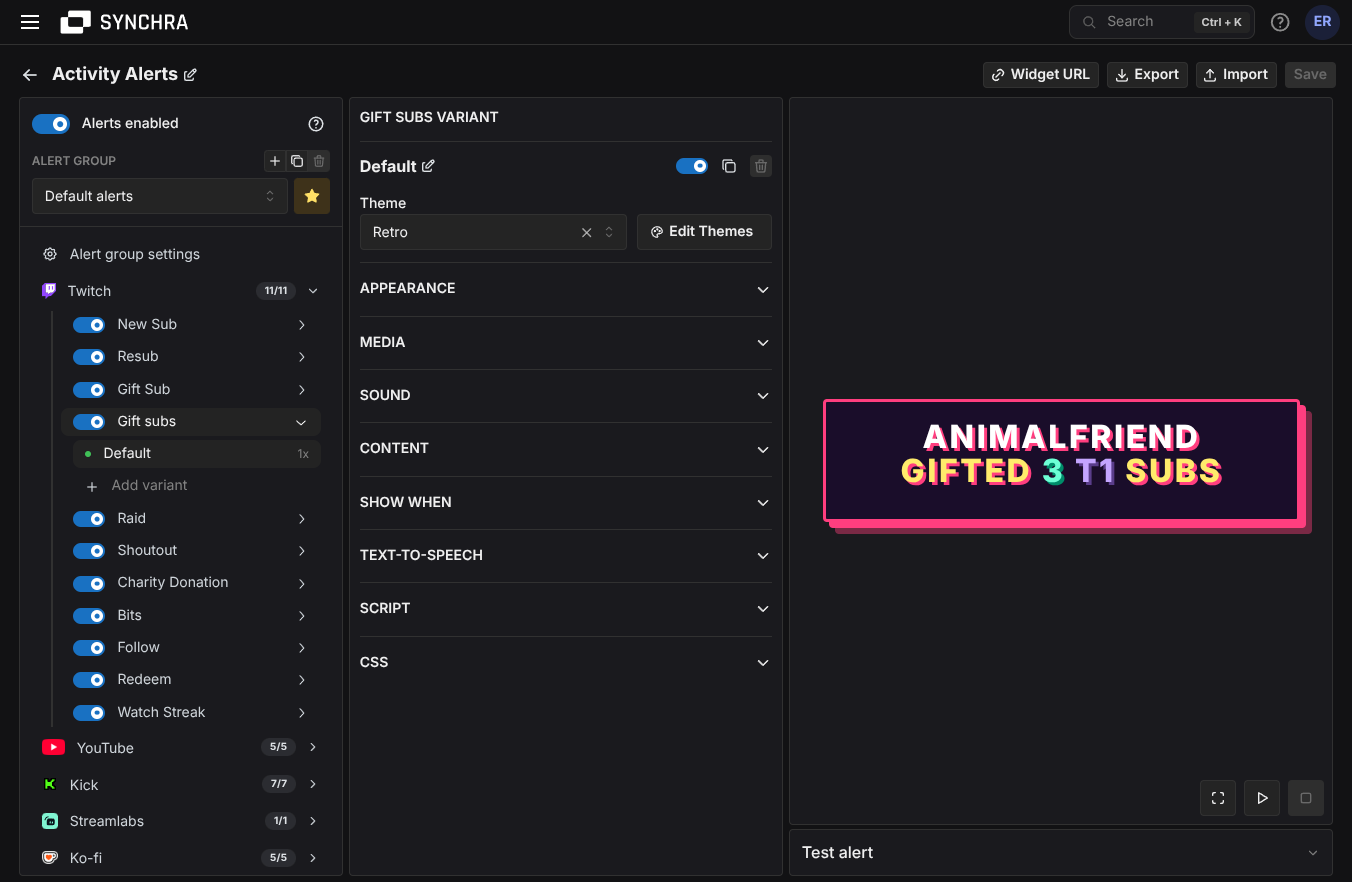
Your alerts should not be split across every platform and donation tool you use. Synchra gives you one OBS alert widget for live activity, with controls for which alerts show on stream, how they look, what they play and which text-to-speech voice they use.

Alerts from every connected platform and donation tool
Choose which follows, subs, gifts, raids, donations and rewards should show on stream, then control the text, sound, images, videos and text-to-speech voice for each alert.
Twitch
Subs, resubs, gift subs, raids, shoutouts, charity donations, bits, follows, channel point redeems and watch streaks.
YouTube
New members, member milestones, gifted memberships, Super Chats, Super Stickers and YouTube gifts.
Kick
Subs, resubs, gifted subscriptions, follows, Kick Kicks and reward redemptions.
TikTok
Gifts, follows, shares, likes, Super Fans and Super Fan Boxes from TikTok Live.
Tips and donations
StreamElements tips, Streamlabs donations, Twitch charity donations and YouTube paid chat events.
Creator memberships
Ko-fi donations, subscriptions, shop orders and commissions, Fourthwall donations, shop orders, gift purchases and memberships, plus Patreon members and pledges.
Reuse the same images, sounds and styles
Start with ready-made alerts, then customize only the ones that need special treatment. Reusable media and themes keep shared images, sounds and styles in one place.
Alert themes
Reuse colors, typography, animations and CSS across alerts so your stream keeps one consistent look.
Images, videos, sounds and voices
Reuse images, videos, sounds and text-to-speech voices across follows, subs, gifts, donations, raids and redeems. Synchra supports TTSMonster, ElevenLabs and Amazon Polly for alert voices.
Switch alert setups
Switch an entire alert setup at once for normal streams, special events, seasonal themes or sponsor segments.
Special alerts for big events
Use different text, media or sounds for high-value raids, large donations, long resubs, tier-3 subs or messages with specific keywords.
Custom CSS and TypeScript
Start with built-in settings, then use custom CSS or TypeScript for layouts and behavior that need exact control.
Live alert controls
Use pause, mute, skip and play-next controls for the Synchra alert queue while the stream is running.
FAQ
Which platforms can trigger Activity Alerts?
Synchra Activity Alerts can use activity from Twitch, YouTube, Kick, TikTok, Rumble, X, Streamlabs, StreamElements, Ko-fi, Fourthwall, and Patreon when those integrations are connected.
How do Activity Alerts show up in OBS?
Create an Activity Alerts widget in Synchra, copy the widget URL and add it to OBS or another tool as a browser source.
Do I have to build every alert from scratch?
No. Synchra includes ready-made alerts for supported alert types, so you can start with working alerts and customize only the ones that need a specific look or sound.
What can I customize?
You can customize which events show alerts, plus alert text, colors, font size, max width, duration, entry and exit animations, images, videos, sounds, text-to-speech, CSS, TypeScript, queue delay and reusable media.
Can bigger donations or raids look different?
Yes. You can use different text, media or sounds based on filters such as amount, count, subscription tier or message keywords.
Can I reuse the same media and sounds across platforms?
Yes. Reusable media, sounds and text-to-speech voices let you update shared alert assets once and use them across matching alerts.
Which text-to-speech providers does Synchra support?
Synchra Activity Alerts support text-to-speech voices from TTSMonster, ElevenLabs and Amazon Polly.
Can I import or export alert settings?
Yes. Activity Alerts settings can be exported and imported as JSON, which is useful for backups or moving an alert setup between channels.
How is this different from the activity feed?
Activity Alerts is the OBS overlay your viewers see and hear. The activity feed is the dashboard view you use to monitor activity while streaming.
Replace scattered alert setups with one widget
Create an Activity Alerts widget, copy the widget URL into OBS and manage what plays on stream from Synchra.
Create Activity Alerts