
Chat Widget
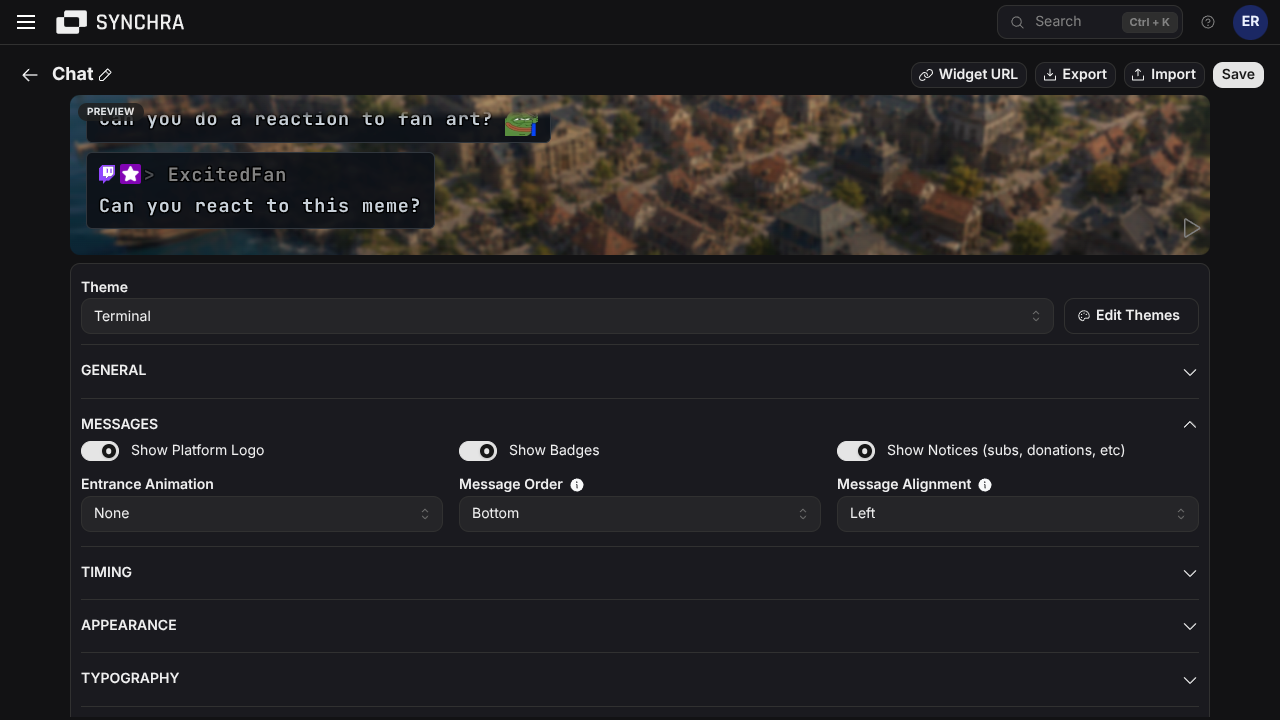
Chat shows your combined Twitch, YouTube, TikTok and Kick chat in OBS and other tools that support browser sources. Use it when you want one chat overlay for every connected platform.
Quick setup
Section titled “Quick setup”- Open the Synchra Dashboard.
- Go to Widgets.
- Create a Chat widget.
- Choose the platforms, message types, notices and display settings you want.
- Click Widget URL and copy the URL.
- Add it to OBS as a Browser Source.
Customization
Section titled “Customization”You can customize platform icons, badges, timestamps, usernames, message text, emotes, notices, themes, colors, background, border, spacing and size settings.
Custom CSS
Section titled “Custom CSS”Chat can be styled using custom CSS. Start with the built-in settings first. Use custom CSS when you need a specific chat bubble layout, badge treatment, message width, notice filter or theme detail.
CSS order: built-in CSS, Theme CSS, then Widget CSS. Later rules win at equal specificity.
HTML structure
Section titled “HTML structure”Simplified generated markup for a chat message:
When Badge is selected for Platform logo display, the provider span additionally receives the chat-message-provider-logo-badge class and the provider-registry color variable:
A notice uses this content inside the same outer item wrapper:
CSS classes
Section titled “CSS classes”| Class | Description |
|---|---|
.chat-container | Full-height root. It owns the widget variables and a size class such as .chat-size-md. |
.chat-messages-container | Container for rendered chat items. |
.chat-widget-message | Wrapper for a rendered message or notice. |
.chat-widget-message--message | Added to a normal chat message item. |
.chat-widget-message--notice | Added to an activity notice item. |
.chat-widget-message--group | Added when consecutive messages are grouped. |
.chat-widget-message--subtype-* | Added for a subtype. The suffix is lowercased and non-CSS-safe characters become -. |
.chat-message-container | Visible message or notice container inside an item wrapper. |
.chat-widget-group-providers | Provider-icon wrapper shown at the start of a grouped message. |
.chat-widget-notice-line | Added to .chat-message-container for a notice. |
.chat-widget-notice-header | Notice header containing the platform, type, user and notice text. |
.chat-widget-notice-body | Notice body containing the user message attached to a notice. |
.chat-widget-notice-type | Notice subtype or type label. |
.chat-widget-notice-user | User who triggered the notice. |
.chat-widget-notice-text | Notice text content. |
.chat-widget-notice-message | User message attached to a notice. |
.chat-message-meta-container | Inline wrapper for platform, badges and username metadata. |
.chat-message-icons-container | Container for platform and badge icons. |
.chat-message-provider-logo | Platform logo, such as Twitch or YouTube. Its data-provider attribute identifies the platform. |
.chat-message-provider-logo-badge | Added when Badge is selected for Platform logo display. Gives every platform logo a unified square background. |
.chat-message-provider-logo-icon | Proportional inner viewport that centers and contains the provider image or SVG. Target this to adjust a logo’s scale or offset. |
.chat-message-badges-container | User badges, such as subscriber or moderator. |
.chat-message-badge | User badge. |
.chat-message-username | Username display. Its provider color is set inline, so a forced custom color needs !important. |
.chat-message-username-separator | Separator between username and message. |
.chat-message-text | Message text content. |
.chat-message-mention | Mentions inside messages. |
.chat-message-link | Links inside messages. |
.chat-message-emote | Emotes inside messages. |
.chat-message-gift-count | Gift count display, such as bits. |
Data attributes
Section titled “Data attributes”| Attribute | Element | Use |
|---|---|---|
data-message-order="top|bottom" | .chat-container | Current message-order setting. Use it to adapt a custom layout to the edge where new messages appear. |
data-message-alignment="left|right" | .chat-container | Current message-alignment setting. Use it to anchor a custom layout to the selected side. |
data-chat-message-type="message" | .chat-widget-message | Target normal chat messages. |
data-chat-message-type="notice" | .chat-widget-message | Target activity notices. |
data-chat-sub-type="<subtype>" | .chat-widget-message | Target the raw message or notice subtype. Omitted when no subtype exists. |
data-chat-provider="twitch" | .chat-widget-message | Target the lowercase provider, such as twitch, youtube, tiktok, kick, rumble or owncast. |
data-provider="twitch" | .chat-message-provider-logo | Target an individual platform logo. This remains accurate when a grouped message contains logos from multiple platforms. |
data-chat-grouped="true" | .chat-widget-message | Target an item made from grouped messages. Omitted on ungrouped items. |
data-badges="subscriber moderator" | .chat-message-container | Space-separated badge types on normal messages. Use [data-badges~="subscriber"] token matching. |
CSS variables
Section titled “CSS variables”| Variable | Value type | Controls |
|---|---|---|
--text-color | CSS color | Built-in message and notice text color. |
--text-shadow-color | CSS color | Built-in four-direction text outline/shadow. |
--chat-size-scale | Number | Message text, icons, emotes, gaps and padding scale. Size presets range from 0.5 to 2.5. |
--chat-message-inside-spacing | CSS length | Inline spacing between metadata, icons and message parts. |
--chat-provider-logo-badge-color | CSS color | Provider-registry background for one platform logo badge. Override background-color on .chat-message-provider-logo-badge in custom CSS. |
--chat-widget-font-family | Font family list | Font for the entire widget. |
--background-color | CSS color token | Resolved background setting available to custom rules. |
--background-opacity | Number from 0 to 1 | Resolved background-opacity setting available to custom rules. |
--border-color | CSS color token | Resolved border setting available to custom rules. |
--border-width | Unitless pixel number | Resolved border-width setting available to custom rules. |
--border-radius | Unitless pixel number | Resolved border-radius setting available to custom rules. |
Text, shadow, size, spacing and font variables affect built-in CSS. For background and border overrides, set the CSS properties directly.
Platform logo badges
Section titled “Platform logo badges”When Badge is selected for Platform logo display, the provider registry supplies each logo’s default background color. Custom widget CSS is loaded after the built-in badge styles, so the class can directly override its size, background, outline and shadow.
Use data-provider to customize one platform. Target the logo itself instead of the outer message because grouped messages can contain multiple platforms.
If an asset has uneven internal whitespace, adjust its inner viewport without changing the outer tile alignment.
Custom font
Section titled “Custom font”Get a font import, then:
Chat bubble style
Section titled “Chat bubble style”Custom size
Section titled “Custom size”If the predefined sizes do not fit your layout, customize the size with --chat-size-scale.
Fixed chat bubble width
Section titled “Fixed chat bubble width”Set a fixed width for chat bubbles when you want a more uniform look.
Hide a notice subtype
Section titled “Hide a notice subtype”Use data-chat-sub-type to hide one notice subtype.
Badge-based styling
Section titled “Badge-based styling”You can style messages differently based on user badges.