Synchra Unified Activity Feed
Multistreaming scatters your activity across platforms: subscriptions in one place, donations in another and memberships somewhere else. Synchra brings it all into one feed.
One timeline for the stream moments that matter
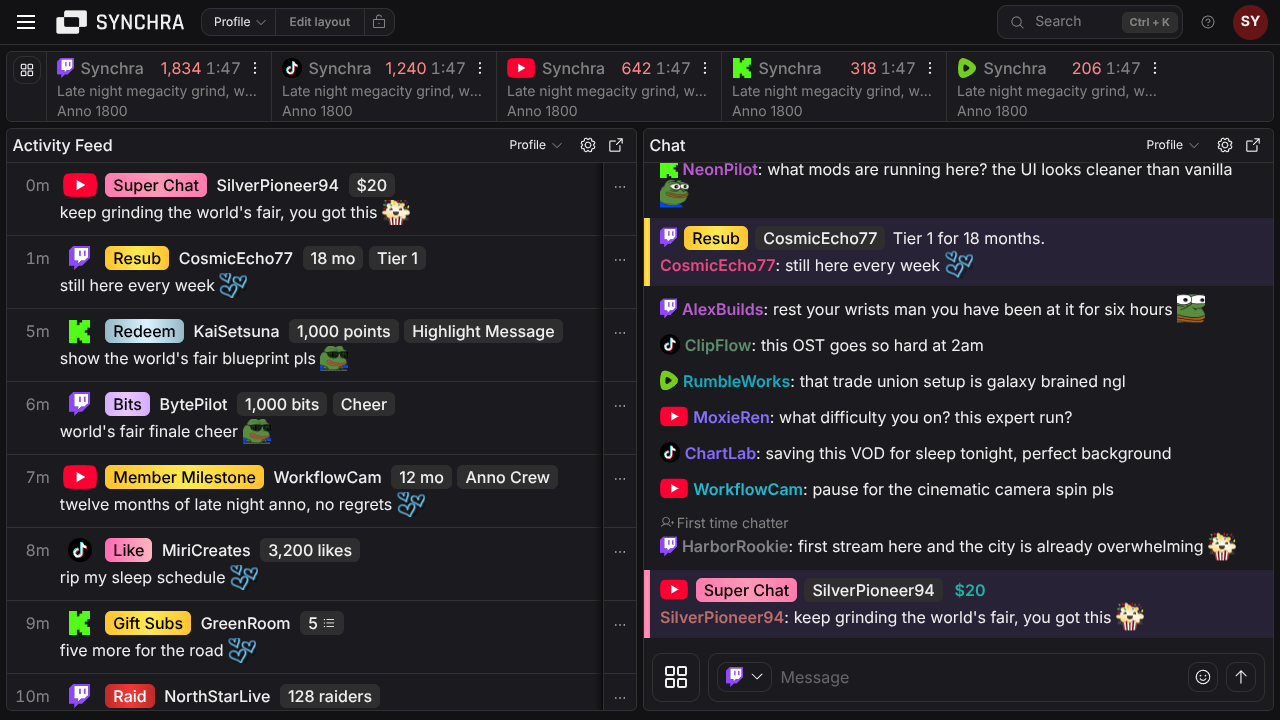
Synchra turns activity from connected platforms into one readable feed.
Subs, members and pledges
Track Twitch subs and resubs, YouTube members and milestones, Kick subs, TikTok Super Fans, Ko-fi subscriptions, Fourthwall memberships and Patreon member activity.
Gifts, bits and Kicks
See gifted subs, gifted memberships, TikTok gifts, TikTok likes, YouTube gifts, Twitch bits, Kick Kicks and reward redemptions as they happen.
Raids, follows and shares
Keep follows, raids, shoutouts, shares and other audience events in the same timeline as revenue events.
Tips, donations and orders
Bring YouTube Super Chats, Super Stickers, StreamElements tips, Streamlabs donations, Ko-fi donations, shop orders and commissions, plus Fourthwall donations, shop orders and gift purchases into one place.
Filter the feed around how you stream
Filter by platform and event
Choose which events show for each platform, then save filters for moderation, revenue, raids, community milestones or a cleaner live view.
Hide smaller events
For events with counts or amounts, show only the ones above the value that matters to you, such as larger raids, bigger gift bundles or higher tips.
Make the feed easier to read
Use read indicators, line wrapping, platform logos, animated emotes and size settings to make the feed comfortable during a live show.
Keep controls nearby
Show Synchra Activity Alerts controls and supported alert controls next to the feed, including pause, mute, skip and play-next actions.
FAQ
Which platforms can appear in the activity feed?
Synchra activity feed supports activity from Twitch, YouTube, Kick, TikTok, Rumble, X, Streamlabs, StreamElements, Ko-fi, Fourthwall, and Patreon when those integrations are connected.
What kinds of activity does Synchra show?
The feed can show follows, subs, resubs, members, member milestones, gifted subs or memberships, raids, bits, Kicks, rewards, Rumble Rants, TikTok gifts, likes and shares, YouTube Super Chats and Super Stickers, tips, donations, Ko-fi orders and commissions, Fourthwall orders, gift purchases and memberships, and Patreon member or pledge events.
Can I filter the activity feed?
Yes. You can hide events per platform and set minimum counts or amounts for bigger events. Saved filters can be used in dashboard panels.
Can the feed show messages and emotes attached to activity?
Yes, when the platform sends a message with the event. Synchra can show message text and animated emotes, and you can turn animated emotes off if you prefer a quieter feed.
Can I pop the activity feed out?
Yes. Synchra includes an activity feed page and dashboard panel, and the dashboard panel can be opened in a popout window with its selected filters.
How is this different from Activity Alerts?
The activity feed is the dashboard view you use to monitor events. Activity Alerts is the OBS overlay that plays visual and audio alerts for viewers.
Can I control alerts from the activity feed?
Yes. The feed can show alert controls for Synchra Activity Alerts and supported alert tools, so you can pause, mute, skip or play the next alert without leaving the feed.
Does Owncast activity appear in the feed?
Owncast is currently used in Synchra for unified chat, bot messages, stream status, stream preview, title updates and moderation. Owncast events do not currently appear in the activity feed.
Unified activity feed
Connect your channels, open the activity feed and stop checking multiple windows.
Setup your unified activity feed