
Streamathon Widget
Streamathon, also called a subathon, shows a live countdown timer in OBS and other tools that support browser sources. Use it when viewer activity should add time to a stream timer.
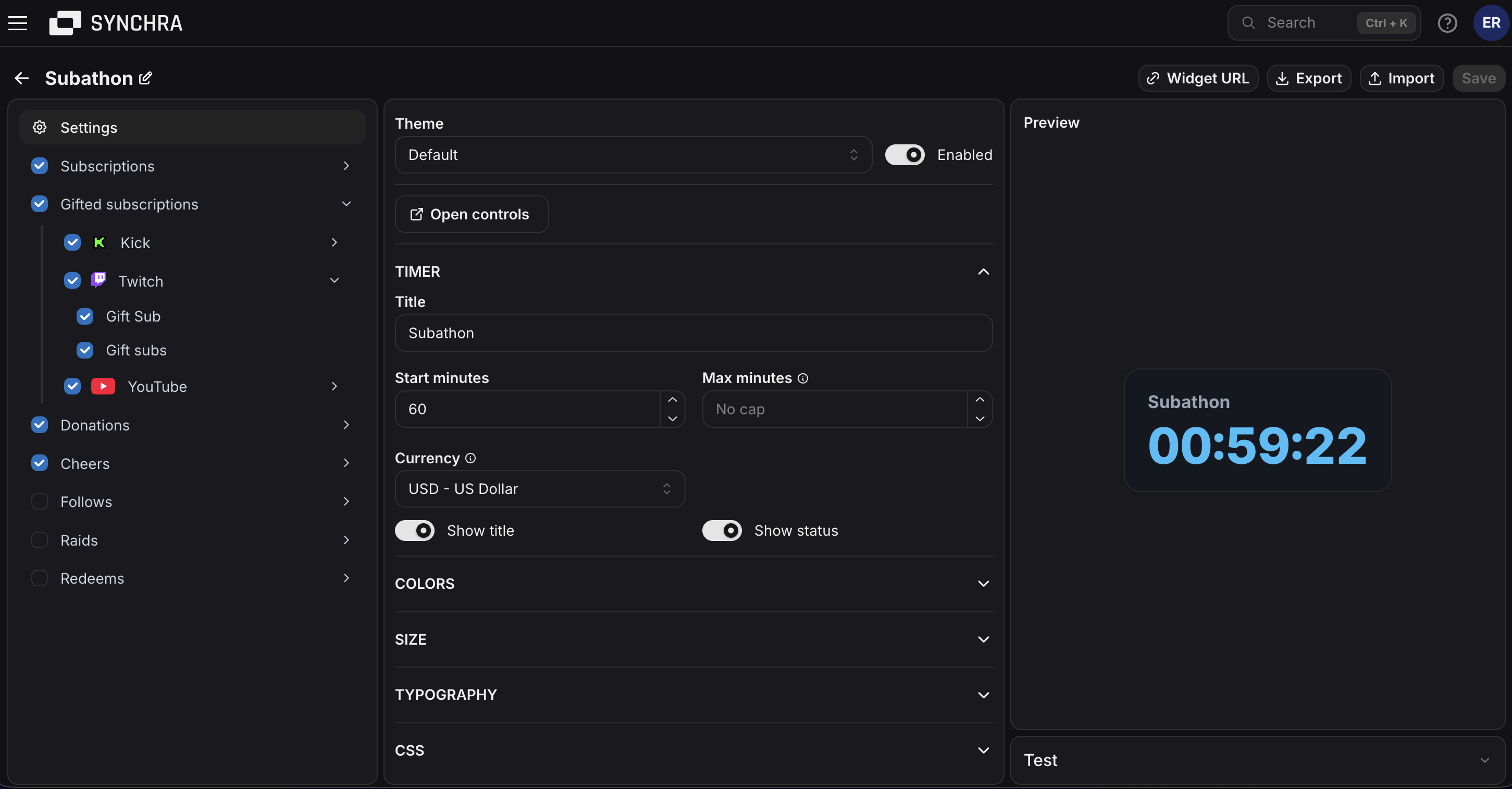
Quick setup
Section titled “Quick setup”- Open the Synchra Dashboard.
- Go to Widgets.
- Create a Streamathon widget.
- Enter a title and starting time.
- Set Ends at if you want to cap it to a specific date.
- Set the base time per activity.
- Select which sources should add time.
- Set each source’s multiplier.
- Click Widget URL and copy the URL.
- Add it to OBS as a Browser Source.
- Open Controls and start the timer.
Timer controls
Section titled “Timer controls”Open controls from the widget settings.
You can start, pause, resume, restart, reset, add time and remove time.
How time is added
Section titled “How time is added”The timer starts with the configured starting time. When it is running, it counts down until it reaches zero. When it is paused, it stays where it is.
Activity such as subs, bits and donations can add time after the timer has started. Activity types start from the base time per activity and can be fine-tuned in the source settings.
Customization
Section titled “Customization”You can customize the title, starting time, end cap, base time per activity, sources, multipliers, subtype multipliers, colors, font, size, padding, border and visibility settings.
Disabling the widget hides it from the browser source.
Custom CSS
Section titled “Custom CSS”Streamathon can be styled using custom CSS. Start with the built-in settings first. Use custom CSS when you need a specific layout, glow, shadow, background or timer treatment.
CSS order: built-in CSS, Theme CSS, then Widget CSS. Later rules win at equal specificity.
HTML structure
Section titled “HTML structure”Simplified generated markup; optional elements are marked.
Layout: vertical content; gain text overlays the timer; recent rows use flexible viewer | duration.
CSS classes
Section titled “CSS classes”| Class | Description |
|---|---|
.streamathon-widget | Root container. It sizes to its content and owns the widget theme variables. |
.streamathon-widget--disabled | Added when disabled. The built-in CSS lowers its opacity in previews. |
.streamathon-widget__content | Inner column that keeps the timer and optional rows aligned. |
.streamathon-widget__title | Optional title. The built-in style truncates it with an ellipsis. |
.streamathon-widget__timer-wrap | Positioned wrapper for the timer and temporary gain text. |
.streamathon-widget__timer | Live countdown. Uses tabular numerals to prevent digit-width shifts. |
.streamathon-widget__timer--bump | Added briefly when activity adds time. It runs the built-in bump animation. |
.streamathon-widget__gain | Temporary added-time text, such as 1m, positioned over the timer. |
.streamathon-widget__status | Optional status text, such as paused, ended or capped. |
.streamathon-widget__recent-events | Optional list of recent time additions. |
.streamathon-widget__recent-event | One recent activity row. |
.streamathon-widget__recent-viewer | Viewer name. The built-in style truncates it with an ellipsis. |
.streamathon-widget__recent-duration | Time added by the event. Uses tabular numerals. |
Data attributes
Section titled “Data attributes”All attributes below are on .streamathon-widget.
| Attribute | Description |
|---|---|
data-status="idle" | Timer has not started. |
data-status="running" | Timer is running. |
data-status="paused" | Timer is paused. |
data-status="ended" | Timer reached zero. |
data-warning="false" | Timer is not in its warning window. |
data-warning="true" | Timer is running with 5 minutes or less remaining. |
CSS variables
Section titled “CSS variables”| Variable | Value type | Controls |
|---|---|---|
--streamathon-widget-text-color | CSS color | Title, status and recent-viewer color. |
--streamathon-widget-background-color | CSS color | Root background. Alpha colors keep the OBS canvas visible. |
--streamathon-widget-border-color | CSS color | Root border color. |
--streamathon-widget-time-left-color | CSS color | Normal timer, added-time text and recent-duration color. |
--streamathon-widget-warning-timer-color | CSS color | Timer color when data-warning="true". |
--streamathon-widget-ended-timer-color | CSS color | Timer color when data-status="ended". |
--streamathon-widget-border-width | CSS length | Root border width. |
--streamathon-widget-border-radius | CSS length | Root corner radius. |
--streamathon-widget-padding | CSS length | Space inside the root. |
--streamathon-widget-font-family | Font family list | Font for the entire widget. |
--streamathon-widget-font-size | CSS length | Timer size; supporting text is sized in em from this value. |
--streamathon-widget-min-width | CSS length or percentage | Minimum root width. |
--streamathon-widget-max-width | CSS length or percentage | Maximum root width. |
Set theme variables on .streamathon-widget.
Custom font
Section titled “Custom font”Get a font import, then: