
Goal Widget
Goal shows a live progress bar in OBS and other tools that support browser sources. Use it for sub goals, donation goals, follower goals, bit goals or mixed goals where several activity types should count together towards a common goal.
You define how much each activity type adds to the goal. Other currencies will be converted into your preferred one using today’s rates. You can add multiple goals to the same widget and it will switch to the next goal when the current one is reached.
Quick setup
Section titled “Quick setup”- Open the Synchra Dashboard.
- Go to Widgets.
- Create a Goal widget.
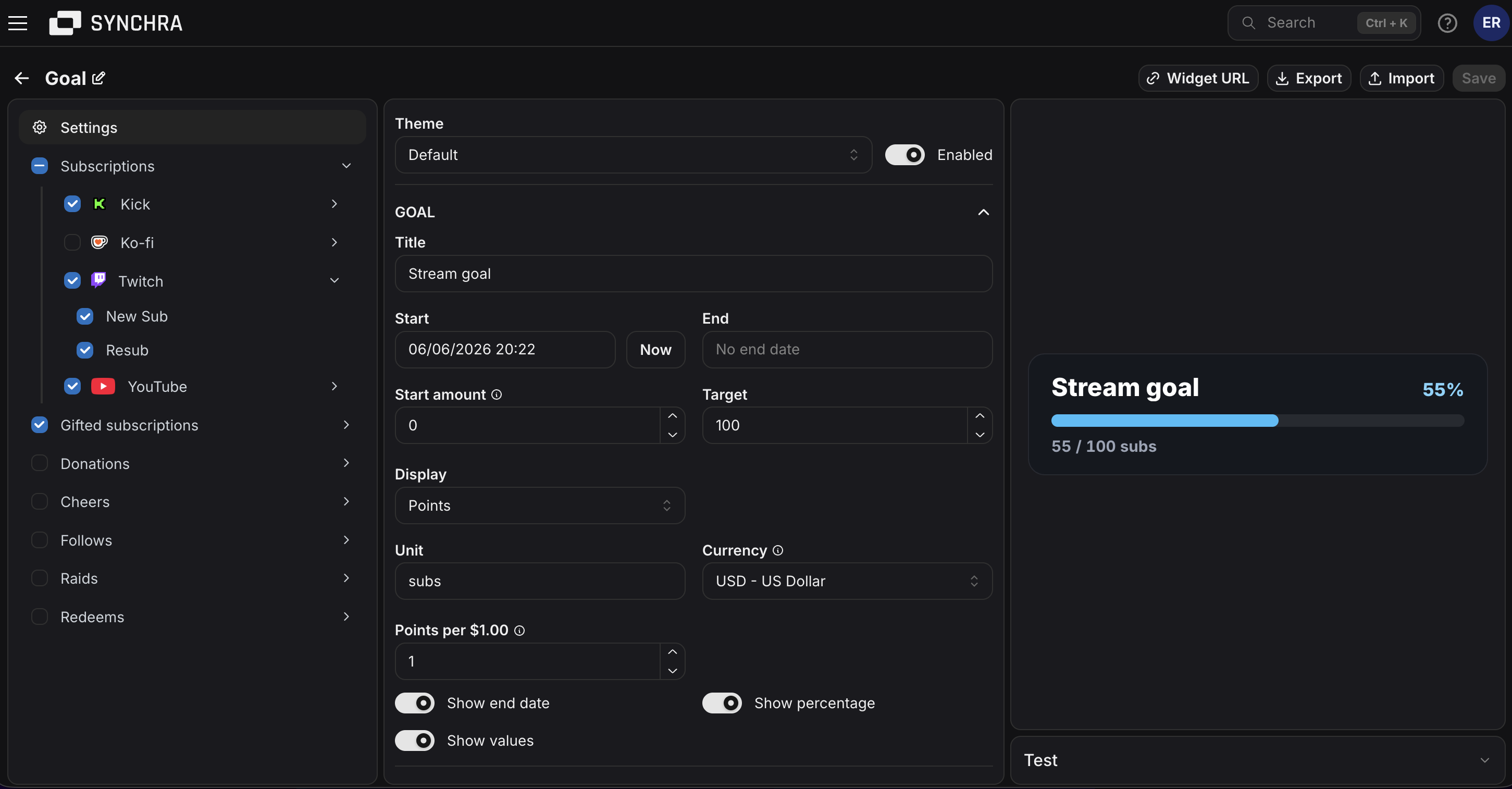
- Add a goal with an amount and title.
- Pick Points or Currency display.
- Set the base amount and start date.
- Select which sources should count toward the goal.
- Click Widget URL and copy the URL.
- Add it to OBS as a Browser Source.
Goal queue
Section titled “Goal queue”Add more goals when you want the widget to continue automatically after one goal is completed.
Each goal has its own additional amount and title. The widget keeps a cumulative progress total and calculates the active target by adding the amounts of the current and previous goals.
For example, goals with amounts of 100, 200 and 50 have cumulative targets of 100, 300 and 350. If the total reaches 125, the widget switches to the second goal and shows 125 / 300. Progress is never reset or discarded when the active goal changes.
Customization
Section titled “Customization”You can customize the goal queue, base amount, default activity value, display mode, unit, currency, dates, sources, multipliers, colors, font, size, padding, border and visibility settings.
Custom CSS
Section titled “Custom CSS”Goal can be styled using custom CSS. Start with the built-in settings first. Use custom CSS when you need a specific layout, glow, shadow, background or animation detail.
CSS order: built-in CSS, Theme CSS, then Widget CSS. Later rules win at equal specificity.
HTML structure
Section titled “HTML structure”Simplified generated markup; optional elements are marked.
Layout: wrapping flex row; title and value first, then the full-width bar and optional deadline.
CSS classes
Section titled “CSS classes”| Class | Description |
|---|---|
.goal-widget | Root container. It is a wrapping flex row and owns the widget theme variables. |
.goal-widget--disabled | Added when disabled. The built-in CSS hides the widget. |
.goal-widget__title | Goal title. It wraps long words and shares the first row with the value. |
.goal-widget__value | Optional current value, target value or both. Numeric text stays on one line. |
.goal-widget__radial-progress | SVG progress ring used by circular themes. Hidden by default. |
.goal-widget__radial-track | Circular theme background and empty progress track. |
.goal-widget__radial-fill | Circular theme progress stroke. Its stroke transitions when progress changes. |
.goal-widget__progress-value | Animated live percentage. Used by the Radial theme and hidden by default. |
.goal-widget__bar | Progress track and clipping container. Its data-progress attribute contains the formatted live percentage. |
.goal-widget__fill | Live progress fill inside the track. Its width transitions when progress changes. |
.goal-widget__deadline | Optional time-left text below the bar. |
Data attributes
Section titled “Data attributes”| Element | Attribute | Description |
|---|---|---|
.goal-widget | data-display-mode="points" | Goal values are formatted as points. |
.goal-widget | data-display-mode="currency" | Goal values are formatted as currency. |
.goal-widget | data-complete="false" | The active goal has not reached its target. |
.goal-widget | data-complete="true" | The active goal has reached its target. |
.goal-widget__bar | data-progress="42%" | Rounded live percentage. It can be displayed from a pseudo-element with content: attr(data-progress). |
CSS variables
Section titled “CSS variables”| Variable | Value type | Controls |
|---|---|---|
--goal-widget-title-color | CSS color | Goal title color. |
--goal-widget-secondary-text-color | CSS color | Deadline color. |
--goal-widget-background-color | CSS color | Root background. Alpha colors keep the OBS canvas visible. |
--goal-widget-border-color | CSS color | Root border color. |
--goal-widget-progress-track-color | CSS color | Empty progress track. |
--goal-widget-progress-fill-color | CSS color | Active progress fill. |
--goal-widget-goal-amount-color | CSS color | Current and target value text. |
--goal-widget-completed-fill-color | CSS color | Fill color when data-complete="true". |
--goal-widget-border-width | CSS length | Root border width. |
--goal-widget-border-radius | CSS length | Root and progress-bar corner radius. |
--goal-widget-bar-height | CSS length | Progress track height. In the Radial theme, this controls the ring stroke width. |
--goal-widget-padding | CSS length | Space inside the root. |
--goal-widget-font-family | Font family list | Font for the entire widget. |
--goal-widget-font-size | CSS length | Base text size. |
--goal-widget-min-width | CSS length or percentage | Minimum root width. |
--goal-widget-max-width | CSS length or percentage | Maximum root width. |
--goal-widget-progress | Percentage, runtime-owned | Live bar and radial progress. Read this value, but do not override it. |
Set theme variables on .goal-widget. Do not override the live --goal-widget-progress value.
Custom font
Section titled “Custom font”Get a font import, then: